Property Setup Toolkit
for Xero
See what each property makes. About 3 hours to set up, then 15 minutes a week.
The 6 Stage Guide and Chart Builder for landlords who want to set up Xero themselves and see profit by property.
- ✓A 19-page guide to all 6 setup stages, with screenshots
- ✓A Chart of Accounts built for your properties
- ✓Limited company or sole trader
- ✓Xero-ready file that imports in minutes
- ✓Download both straight after payment
- ✓Up to 3 free fixes to your chart for 14 days
What you get
One purchase, two parts. You build your chart on this page, then download it with the guide that shows you what to do with it.
PDF · 19 pages
The 6 Stage Guide
Every stage of setting up Xero for a property business: the exact clicks, real Xero screenshots, worked examples and a checklist for each stage. Each stage links to the point in my walkthrough video where I do it.
CSV · ready to import
Your Chart of Accounts
Built from your answers below: an investment property code for each property, a mortgage code for each mortgage, a director's loan account for each director, and the income and cost codes a landlord needs. You import it in Stage 1 of the guide.
Already have the free 6 Stage Blueprint?
Keep it. The Blueprint tells you what the six stages are. The toolkit shows you how to do each one, and builds your chart for you.
| Compare | Free Blueprint | Toolkit |
|---|---|---|
| What it is | One page | A 19-page guide |
| Detail | The six stages in order, each explained by email over 7 days | The exact clicks, real Xero screenshots, worked examples and a checklist for every stage |
| Chart of Accounts | A template you edit yourself | Built for you, with your properties, mortgages and directors already named, ready to import |
| Price | Free | £29 one-off |
Look inside the guide
19 pages. Stage 1 is shown in full below, so you can see the level of detail. The other stages are blurred until you buy.
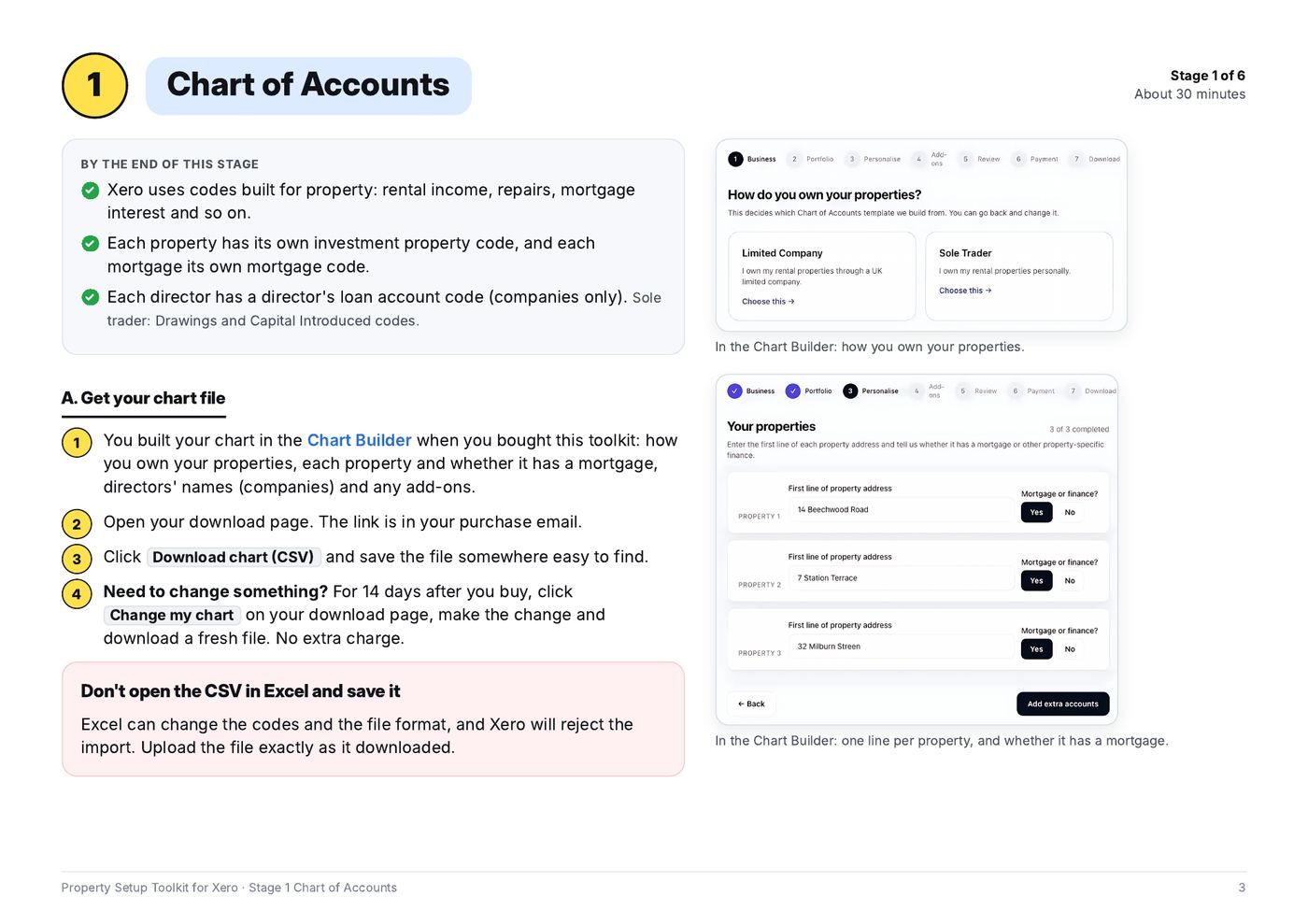
Stage 1
Chart of Accounts
Import your chart into Xero, and fix any import errors.
 Unlocks after purchase
Stage 2
Add Properties
One tracking category, an option for each property, plus Portfolio expenses.
 Unlocks after purchase
Stage 3
Opening Balances
Enter your trial balance, with worked examples for companies and sole traders.
 Unlocks after purchase
Stage 4
Bank & Automate
Connect your bank and set rules that tag each property for you.
 Unlocks after purchase
Stage 5
Reconcile
A 15-minute weekly routine, plus purchases, mortgages and letting agent statements.
 Unlocks after purchase
Stage 6
Review
A Profit and Loss by Property report, and the three reports to check each month.
Build your chart
About 5 minutes, then payment. Have the first line of each property's address to hand, and your directors' names if you're a limited company. Made a mistake after buying? You can fix your chart up to 3 times in 14 days.
How do you own your properties?
This decides which Chart of Accounts template your chart is built from. You can go back and change it.

Who made this
David Slater ACMA CGMA
I run Accufy Accounting, a practice for property investors. This is the same Xero setup I use on my own portfolio and for my clients, written down step by step so you can do it yourself.